Eclipse Scripting API Object Model
The Eclipse data model is presented in the Eclipse Scripting API as a collection of .NET classes with properties and methods. The class hierarchy is an abstraction over the ARIA Radiation Therapy Management (RTM) data model and uses similar terminology as the DICOM object model. The classes of the object model hide all the details of interacting with the database and creating the in-memory representations of the Eclipse data. Because the Scripting API is a .NET class library, all details of managing the memory and other low-level resources are also transparent to you when you create scripts.
Eclipse Scripting API Concepts
The most important concepts of the Eclipse Scripting API are described below.
Coordinate System and Units of Measurement
The Eclipse Scripting API uses the following coordinate systems and units of measurement.
Distances and Positions
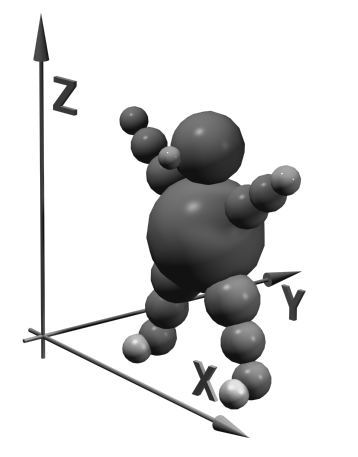
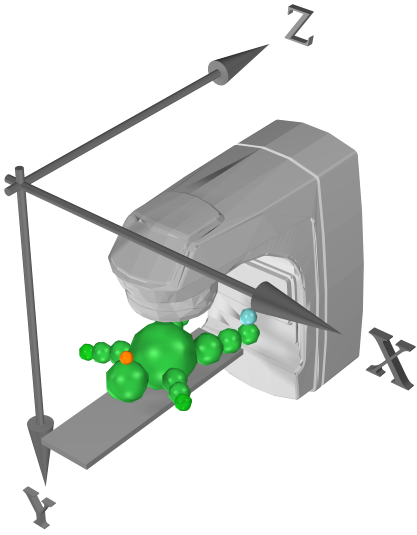
In all methods and properties that work with distances and positions, the unit of measurement is millimeters. The positions in 3D space are returned using the DICOM coordinate system. Note that this differs from the Planning Coordinate system used in the Eclipse user interface, where the unit of measurement is centimeters. In addition, when the coordinate values are displayed in the Eclipse user interface, the following are taken into account:
- The possible user-defined origin of an image.
- The treatment orientation of the plan.
- The axis definition of the planning coordinate system.
 |
 |
|---|---|
| Figure 1: DICOM Coordinate System | Figure 2: Standard Planning Coordinate System |
The Eclipse Scripting API has methods that convert values from the DICOM coordinate system to the same representation that is used in the Eclipse user interface. For more information on the display of 3D coordinates in the Eclipse user interface, refer to Eclipse Photon and Electron Reference Guide. For more information on the DICOM coordinate system, refer to the DICOM standard.
Dose Values
In the Eclipse Scripting API, dose values are always represented with the separate VMS.TPS.Common.Model.Types.DoseValue type. In addition to the actual floating point value of the variable, this type also holds the measurement unit of the dose. The measurement unit can be Gy or cGy, depending on the selected clinical configuration. It can also be a percentage if relative dose is used.
Treatment Unit Scales
All methods and properties of the Eclipse Scripting API return the treatment unit and accessory properties in the IEC61217 scale. This feature allows you to create scripts despite the scale interpretation differences between treatment unit vendors.
User Rights and HIPAA
The Eclipse Scripting API uses the same user rights and HIPAA logging features as Eclipse. When a plug-in script is executed, the script applies the same user rights as were used to log into Eclipse. When you execute a stand-alone executable script, the user name and password are automatically passed via the new single sign-on technology implemented in the Eclipse release so that no additional dialogs are required to authenticate the user to the system. According to HIPAA rules, a log entry is made for each patient opened by a standalone script. Additionally, the Eclipse Scripting API follows the rules of department categorization of ARIA RTM.
Working with Several Patients
The context of the running Eclipse instance is passed to plug-in scripts. They work only for the one patient that is selected in that context. In contrast, stand-alone executables can open any patient in the database. However, only the object model of a single patient is available at a time. The previous patient data must be explicitly closed before another patient is opened. If you try to access the data of a patient that has been closed, an access violation exception is generated.
Overview of the Object Model
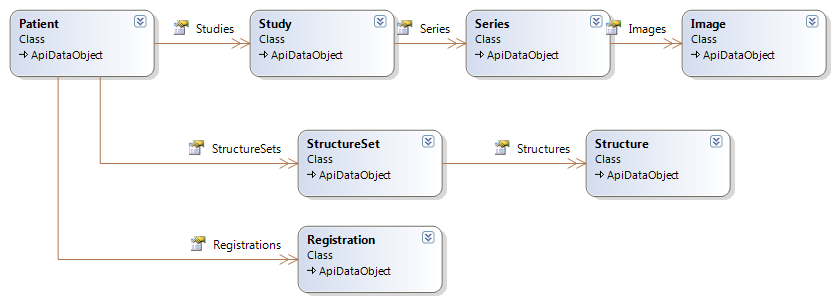
The following diagram gives an overview of the Image-related objects in the Eclipse Scripting API.
 |
|---|
| Figure 3: Image Data Model |
The diagram contains the following objects:
- A
Patientthat has a collection ofStudy,StructureSetandRegistrationobjects. - A
Studythat has a collection ofSeriesobjects. - A
Seriesthat has a collection ofImageobjects. - A
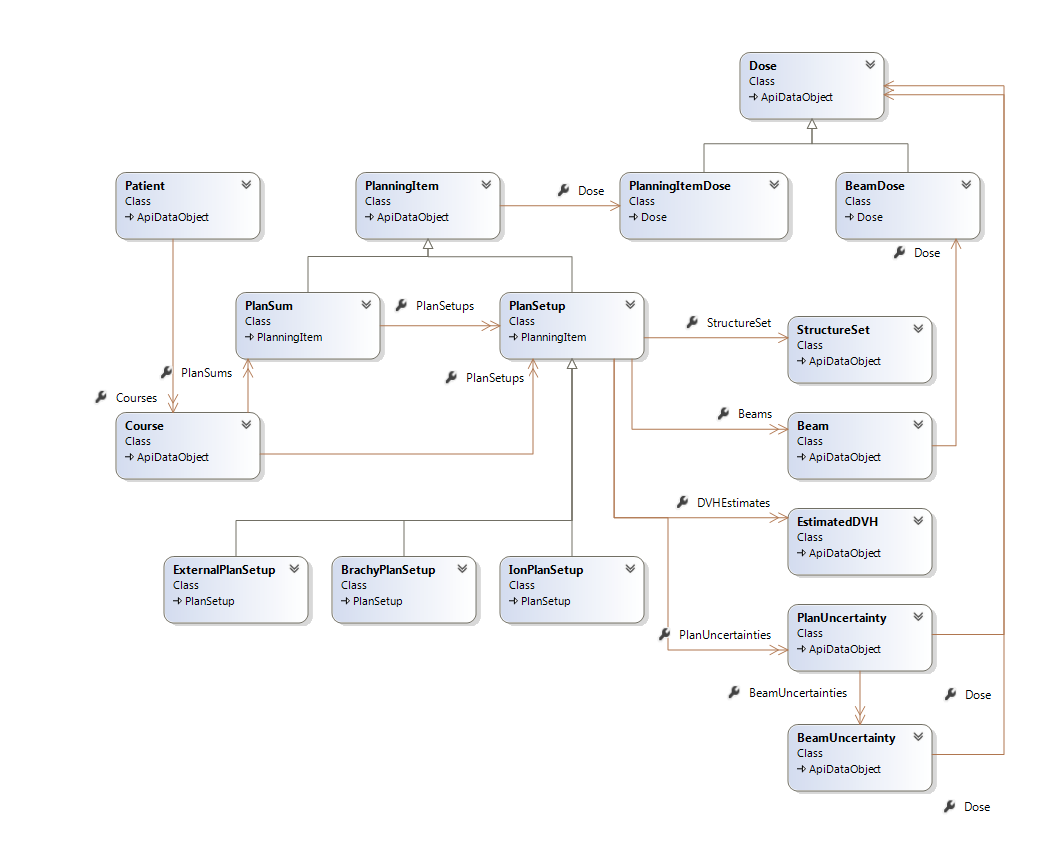
StructureSetthat has a collection ofStructureobjects. Another important section of the Eclipse Scripting API is the model of Plan-related objects shown in the following diagram.
 |
|---|
| Figure 4: Plan Data Model |
The diagram contains the following objects:
- A
Patientthat has a collection ofCourseobjects. - A
Coursethat has a collection ofPlanSetupandPlanSumobjects. Each of them is derived from the commonPlanningItembase class. EachPlanSetupobject is anExternalPlanSetup, aBrachyPlanSetup, or anIonPlanSetup. - A
PlanningItemclass that has a direct (but nullable) relationship with aPlanningItemDoseclass. - A
PlanSetupthat has a collection ofBeamobjects.Beamhas a direct (but nullable) relationship with aBeamDoseclass. - A
PlanSetupthat has a direct (but nullable) relationship withStructureSetandEstimatedDVHobjects. - A
PlanSetupthat has a collection ofPlanUncertaintyobjects. - A
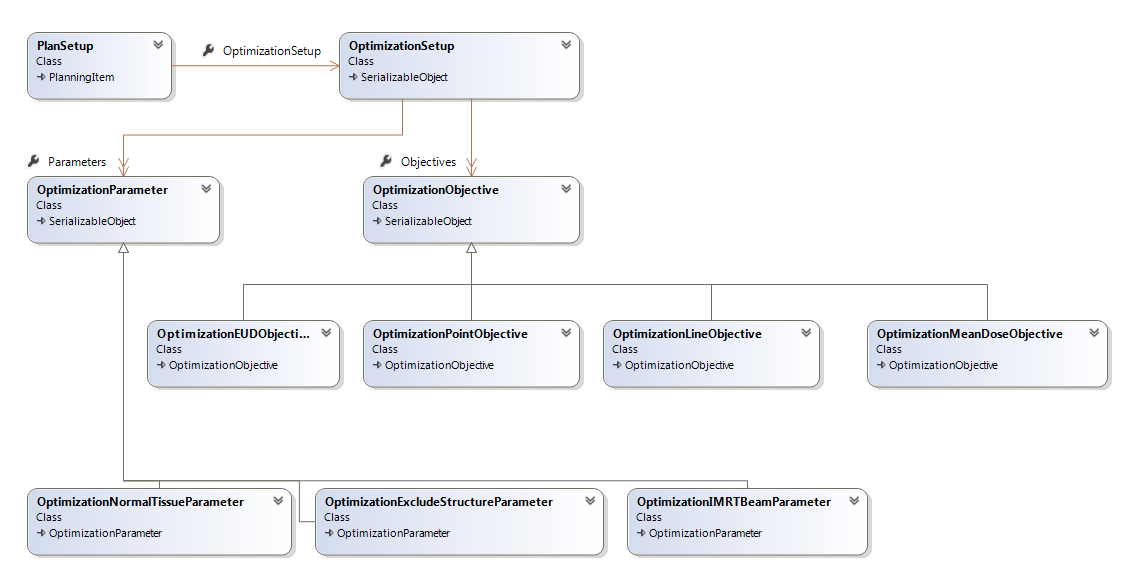
PlanUncertaintyhas a collection ofBeamUncertaintyobjects, and a direct (but nullable) relationship with aDoseclass. BeamUncertaintyhas a direct (but nullable) relationship with aDoseclass. The object model related to Plan optimization is visualized in Figure 5.
 |
|---|
| Figure 5: Plan Optimization Data Model |
The diagram contains the following objects:
- A
PlanSetupthat has an association to theOptimizationSetup. - An
OptimizationSetupthat has a collection ofOptimizationParameterobjects. Each OptimizationParameter object is anOptimizationNormalTissueParameter,OptimizationExcludeStructureParameter,OptimizationIMRTBeamParameter, orOptimizationPointCloudParameter. - An
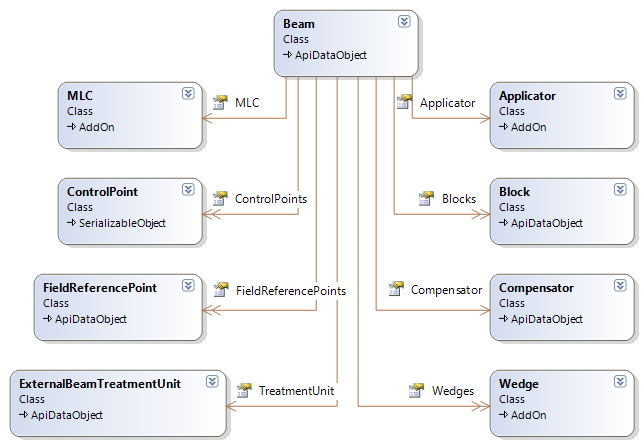
OptimizationSetupthat has a collection ofOptimizationObjectiveobjects. Each object is anOptimizationPointObjective,OptimizationEUDObjective,OptimizationLineObjective, orOptimizationMeanDoseObjective. The following diagram shows the objects related to an individualBeam:
 |
|---|
| Figure 6: Beam Data Model |
The diagram contains the following objects:
- An MLC and a
ControlPointcollection of theBeam. - An Applicator, a
Compensatorand a collection of Blocks and Wedges if defined for theBeam. - A collection of
FieldReferencePointobjects for theBeam. - An
ExternalBeamTreatmentUnitobject that represent the treatment unit.
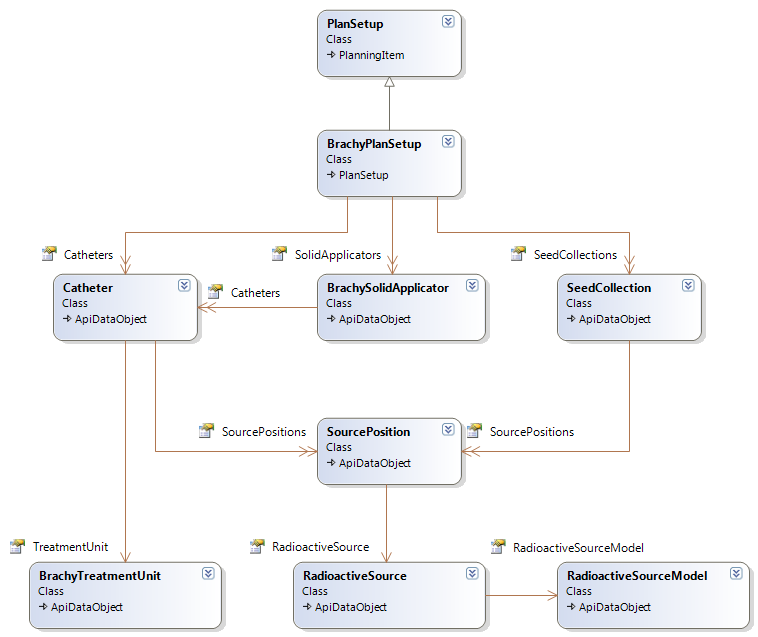
The following diagram shows the data model for brachytherapy plans:
 |
|---|
| Figure 7: Brachytherapy Data Model |
The diagram contains the following objects:
- A
BrachyPlanSetupis derived fromPlanSetup. TheBrachyPlanSetuphas a collection of Catheters, BrachySolidApplicators, and SeedCollections. Note thatBrachyPlanSetups can be accessed through theCoursein the same way as PlanSetups. - A
BrachySolidApplicatorhas a collection of Catheters. - A
Catheter(applicator channel central line or needle) has aBrachyTreatmentUnitand a collection of SourcePositions. - A
SeedCollectionhas a collection of SourcePositions. - A
SourcePositionhas aRadioactiveSource. - A
RadioactiveSourcehas aRadioactiveSourceModel.
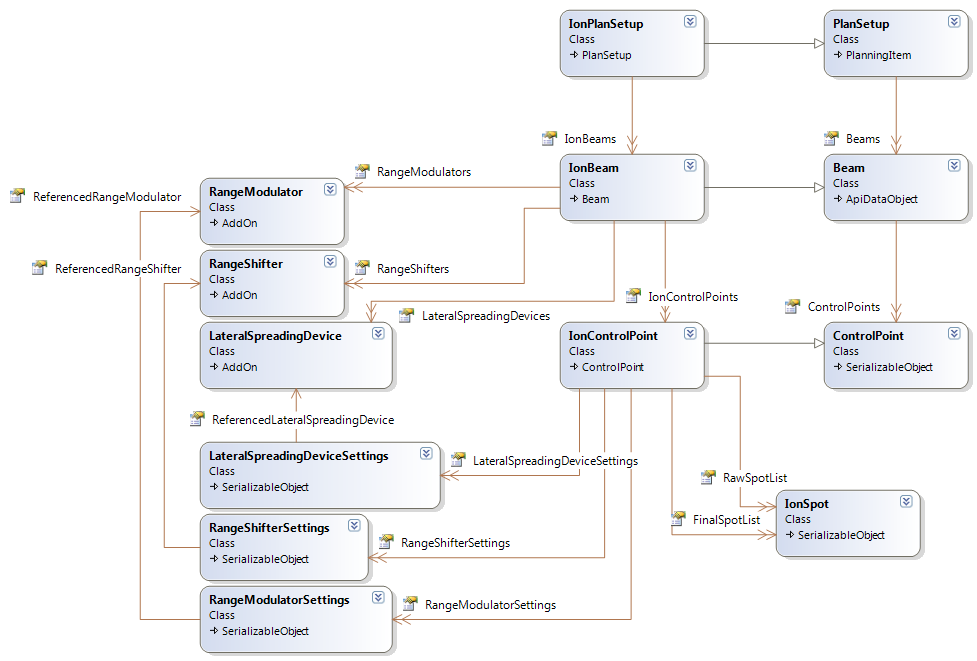
The following diagram details the proton plan data model:
 |
|---|
| Figure 8: Proton Plan Data Model |
The diagram contains the following objects:
- An
IonPlanSetupis derived from PlanSetup. TheIonPlanSetuphas a collection ofIonBeams. IonBeamis derived from Beam. TheIonBeamhas collections of IonControlPoints, RangeModulators, RangeShifters, and LateralSpreadingDevices.- The
IonControlPointis derived from ControlPoint. It provides access to the raw spot listIonSpotobjects through property RawSpotList and access to the final spot list through property FinalSpotList. IonControlPointhas collections ofLateralSpreadingDeviceSettings,RangeShifterSettings, andRangeModulatorSettings.LateralSpreadingDeviceSettingscontains control-point-level settings for aLateralSpreadingDeviceowned by the IonBeam.RangeShifterSettingscontains control-point-level settings for aRangeShifterowned by the IonBeam.RangeModulatorSettingscontains control-point-level settings for aRangeModulatorobject owned by the IonBeam.
The properties of each object are described in detail in Eclipse Scripting API Online Help.